A Notion workspace for small Jewish teams
Keep your community’s knowledge with the community.
Shalom Desk is a connected Notion workspace for the people who keep Jewish organizations running. Give colleagues a place to find the records and working notes they need, and leave a usable desk for whoever takes over.
Explore the workspace before you decide. Self-serve template: $149. Setup help is available; Notion is billed separately.
The Goldberg Household
- Members
- Dana, Ari, + 2 children
- Membership
- Active
- Pledge
- $360 · linked
- Religious school
- 2 enrolled
- High Holidays
- 4 seats held
The work behind communal life
The details matter because the people do.
Knowing a family means knowing more than who attended. Your team carries the context behind a welcome, a follow-up call, or a change in plans. Shalom Desk gives the records supporting that work a shared home.
Keep the household in view
Separate records for households and individuals let you connect membership and participation without losing sight of the people involved.
Follow a commitment through
Link a pledge and the gifts received to the same household. The workspace organizes the information you enter so a colleague can understand what has been recorded.
Leave a useful program record
Keep registrations connected to the event, and use its page for the run sheet and notes for next time. An incoming organizer has somewhere to begin.
First, what is Notion?
A workspace your team can shape and maintain.
Notion brings documents and connected records into one app. Shalom Desk supplies a starting structure inside your organization’s own Notion account. Someone on your team will need to learn its upkeep and help colleagues use it.
Budget for the platform
Notion charges separately for paid team seats. Choose a plan around the access controls and features your team needs, then include it in your ongoing budget.
Notion’s nonprofit program currently offers 50% off Business for approved organizations. Notion verifies applications directly.
Learn one working area
Begin with the screens one colleague needs for a real task. Practise finding a record and making an update before bringing more of the office into the workspace.
Choose access deliberately
Decide who may see each kind of information before inviting the team. Permissions depend on your Notion plan and setup; a filtered view alone does not protect a record.
Adapt it as you learn
Adjust fields and views as your process becomes clearer. Document changes to the shared structure so the next person can maintain it.
When responsibilities change
A handover should include the knowledge behind the job.
Communal work gathers history. An administrator remembers why a process changed; a volunteer knows what made last year’s program work. Putting that knowledge where colleagues can use it helps the work continue through a change of hands.
- Last year’s program page can hold the plan and the changes worth carrying forward.
- A shared record gives colleagues an agreed place to check the latest information.
- Written handover notes give a new administrator a starting point for questions.
The full workspace
A connected starting point. Room to grow at your pace.
The template contains eight dashboards over thirty linked databases. When dashboards show the same source record, an edit is reflected in those views. The sections below show what is included; your team can begin with the area it needs now.
Membership
Households, members, and the pastoral thread that connects them.
Finance
Records of gifts, commitments, invoices, and payments.
Events
Programs, registrations, and a record of who showed up.
Education
Students, classes, and religious-school attendance.
Communications
A place to record communications and campaign activity.
Worship & Services
A starting structure for the service calendar and holidays.
Personnel
Staff, volunteers, roles, and who is covering what.
Facilities & Ops
Spaces and event bookings, with headroom to grow.
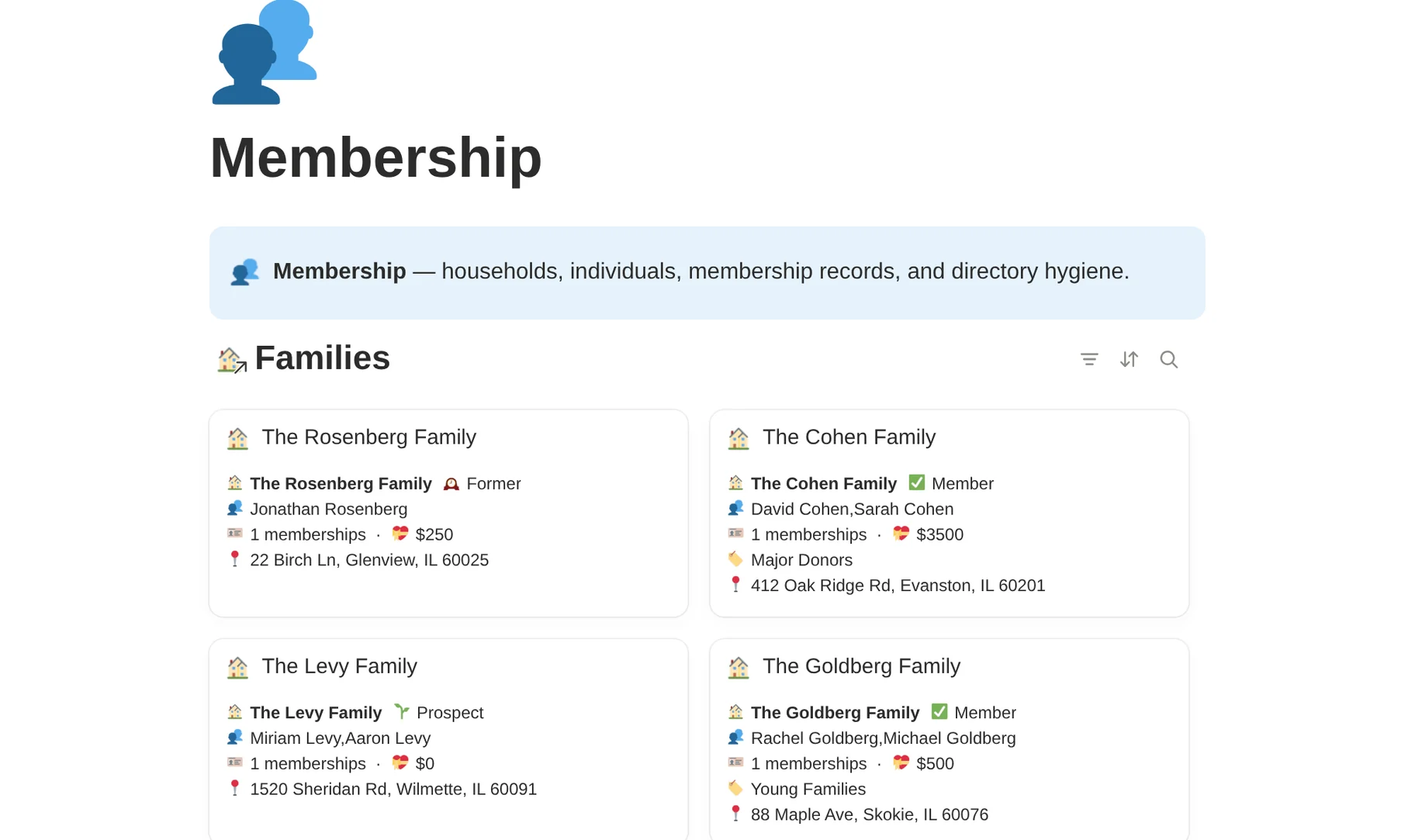


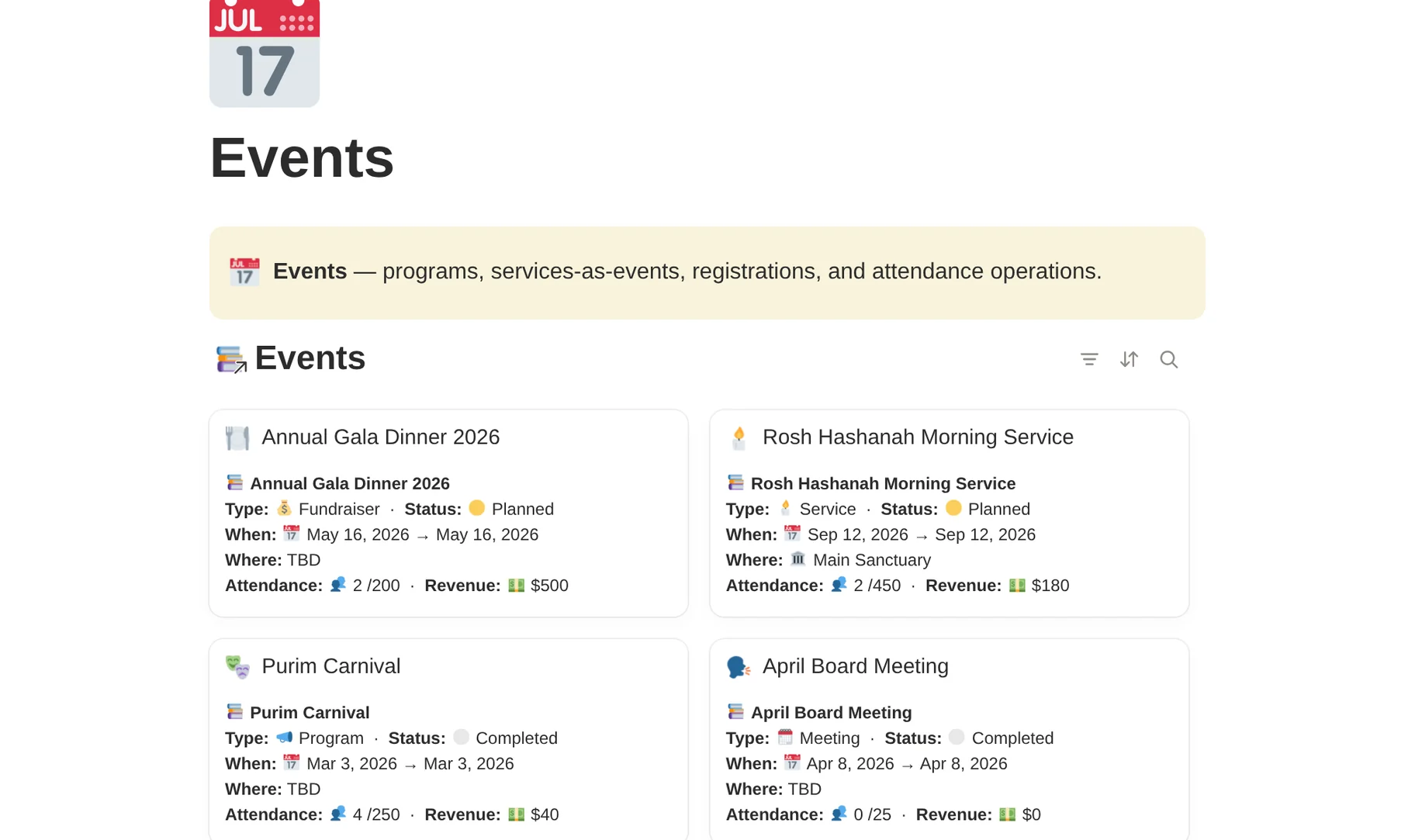


Some databases, including Segments, are shared across areas. The preview contains sample records so you can inspect the structure before buying.
Why this workspace
A Jewish starting point, open to your way of working.
Communities organize themselves differently. Shalom Desk brings a structure for familiar communal work that you can adapt to your own responsibilities and practices.
Begin with familiar work
The starting structure includes households and religious-school records, with areas for worship and community care. Review how each fits before adding real information.
Keep the context nearby
A gift and a program registration can link to the same household. Notes and instructions can live on the relevant page, alongside its structured information.
Make the structure legible
The preview and guides explain how the workspace connects. Use them to decide what to adopt, and to help the person who will look after it.
The hands behind it
Built by someone you can talk to.
Choosing a workspace means deciding how your team will work together. You should be able to ask the person who designed it why it works the way it does.
Shalom Desk was built by Jacob Sager, an independent enterprise architect who builds workspaces and automations. His approach to Shalom Desk begins with the work people are already doing and the knowledge their colleagues need to share.
Bring a specific process and the tools you use today. Jacob can help you judge whether the existing template fits, what setup would involve, and where a custom project would need a separate scope.
Three ways to start
Choose how much help you need to begin.
Set up the template yourself, work with Jacob on one area, or scope a custom project around a more involved process.
The template is included in both services. Your Notion subscription is separate in every option; its cost depends on your plan and paid team seats. Check Notion pricing.
Shalom Desk
For someone comfortable setting up Notion and maintaining the workspace for their team.
- Eight connected area dashboards
- All 30 databases in the workspace
- Record templates inside the core databases
- A Clean Start copy, demo data already cleared
- Demo copy for learning the structure
- The Getting-Started walkthrough
- Released template updates to apply to your copy
Template + Onboarding
A guided launch of one agreed working area, with real records and practice for the team.
- Everything in the template
- Agree the first area and setup scope
- Prepare one agreed source of initial records
- Guided setup and a 90-minute working session
- 30 days of email help for the agreed setup
Custom Build
For work that needs a different structure or a more involved migration. Begin with discovery.
- Template and an agreed implementation plan
- Written blueprint and fixed scope
- Workflow changes defined before the build
- Agreed data sources and migration work
- Training and documented handover
Try the template with a 30-day refund window.
Use your copy on a real piece of work. If it does not earn its place, contact Jacob within 30 days of purchase for a full refund of the $149 template price. Service engagements have their own scope and terms.
How it goes
Give the first area a proper start.
Choose the first job
Pick a process that needs a shared home and name the person who will maintain it. Decide what a useful first version should let a colleague do.
Prepare the records
Use the Clean Start copy, agree which records belong there, and check access before importing. Keep the demo copy separate for reference.
Practise the handover
Have a colleague find a record and make an update using your notes. Add more areas when the team is ready to maintain them.
A practical fit
Start with the work that needs a shared home.
Shalom Desk is intended for small Jewish teams that want to shape their own workspace. A named person should own its upkeep, with time for colleagues to learn the part they will use.
When it is worth a closer look
A staff handover is approaching. A recurring program has outgrown its spreadsheet. Your team already uses Notion and wants its records connected. These are useful starting points for a conversation about fit.
How it fits with existing tools
Keep using the systems you rely on for payments and accounting. Agree where each kind of information is maintained before adding it to Shalom Desk. External imports or syncs need their own setup; buying the template does not connect those tools automatically.
Need dues collection or a member portal as your main purchase? Compare those requirements with dedicated synagogue platforms before choosing a workspace.
Your starting point
What should the next person be able to pick up?
Bring one process that depends too heavily on someone remembering how it works. We can look at whether Shalom Desk would give it a useful home.
Prefer to explore on your own? See the $149 template and its 30-day refund terms.
Made for the community. Free to explore.
Want to talk it through first?
Tell Jacob what your team needs to carry forward.
Describe the work you want to organize and the tools holding it today. We will start by considering fit and a manageable first scope. You can ask questions before committing to a service.
Start a conversation